Realme UI 7.0 Beta Now Available on 11 New Phones: Full List Inside
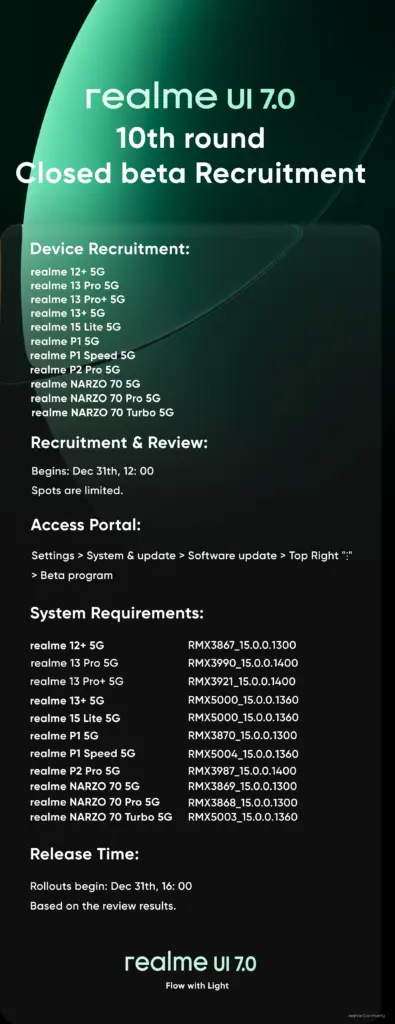
Realme has recently launched the 10th round of its Realme UI 7.0 closed beta program, expanding the list of compatible devices by adding a total of eleven new smartphones. This latest batch includes several models from the Narzo series, P-series, and some from the number series. Below is the complete list of devices along with the firmware versions required to participate in the beta program.
The company announced this update through a post on the Realme community forum, highlighting that Realme UI 7.0 will now be available for these 11 new devices. Each device must be running a specific firmware version to qualify for the beta program. Here are the details:
- Realme 15 Lite 5G – RMX5000_15.0.0.1360
- Realme 13 Pro+ 5G – RMX3921_15.0.0.1400
- Realme 13 Pro 5G – RMX3990_15.0.0.1400
- Realme 13+ 5G – RMX5000_15.0.0.1360
- Realme 12+ 5G – RMX3867_15.0.0.1300
- Realme P2 Pro 5G – RMX3987_15.0.0.1400
- Realme P1 5G – RMX3870_15.0.0.1300
- Realme P1 Speed 5G – RMX5004_15.0.0.1360
- Realme NARZO 70 Turbo 5G – RMX5003_15.0.0.1360
- Realme Narzo 70 Pro 5G – RMX3868_15.0.0.1300
- Realme Narzo 70 5G – RMX3869_15.0.0.1300
Applications for the beta program are currently open and will remain available until all slots are filled. According to the community post, there are a total of 2,000 applications per model. Therefore, it is advisable to apply as soon as possible, as these slots tend to fill up quickly.
How to Sign Up for the Realme UI 7.0 Beta Program
To apply for the Realme UI 7.0 beta program, follow these steps:
- Ensure that your Realme phone is running the required firmware version. You can check this by going to Settings > About device > Version and looking at the version number.
- Enable developer settings by navigating to Settings > About device > Version > Version number, and then tapping the build version seven times in quick succession.
- Once developer options are enabled, go to Settings > About device and tap on the Realme UI 7.0 banner at the top.
- Tap the three dots button in the upper-right corner and select Beta program.
- Navigate to Early Access > Apply Now and submit the required details to complete your application.
After submitting your application, you may receive the Realme UI 7.0 beta update immediately, depending on the rollout schedule. In some cases, it might take a few days. Before downloading the update, make sure your device has at least 10GB of free storage and a battery charge of at least 40% to ensure a smooth upgrade.
It’s important to note that this is a beta version, so some features or apps may not work as expected. Realme advises users to back up their important data before proceeding, just in case any issues arise during the installation process. Although such problems are rare, taking precautions is always recommended.
For more updates on Realme and other tech news, keep an eye on our Realme section. You can also join our Telegram channel to stay informed about the latest launches, software updates, and technological advancements.
Posting Komentar